Understanding Variables and Data Types in JavaScript
I am a developer from India.
1. Introduction: The "Box" Analogy
Imagine you are moving houses. You have many items: books, clothes, and kitchenware. To keep things organized, you put them into boxes.
You write a label on the box (e.g., "Kitchen", "Books").
You put specific items inside.
Later, when you need your books, you look for the box labeled "Books" and open it.
In JavaScript:
The Box is the Variable.
The Label is the Variable Name.
The Items Inside are the Data/Values.
Why do we need variables? Without variables, you would have to type the actual data every time you wanted to use it. If you wanted to say "Hello, Alice" ten times, you'd type "Alice" ten times. If her name changed to "Bob", you'd have to find and change it ten times. With a variable:
let userName = "Alice";
console.log("Hello, " + userName);
// Later...
userName = "Bob"; // Change it once here
console.log("Hello, " + userName); // Automatically updates everywhere
2. Declaring Variables: var, let, and const
JavaScript gives us three keywords to create these "boxes".
The Modern Standard: let and const
Introduced in ES6 (2015), these are the tools you should use 99% of the time.
A. let (Changeable)
Use let when the value inside the box might change later.
let score = 0;
score = 10; // ✅ Allowed: We updated the score
score = 20; // ✅ Allowed: Updated again
B. const (Sealed)
Use const (short for constant) when the value should never change after creation. This prevents accidental bugs.
const pi = 3.14159;
// pi = 3.14; ❌ ERROR: Cannot reassign a constant
Note: If you try to change a const, JavaScript will throw a TypeError.
C. var (The Old School Box)
Before 2015, var was the only way. It has strange behaviors regarding scope (explained below) that often cause bugs.
- Advice: Avoid using
varin modern code unless you are maintaining very old legacy scripts.
3. Primitive Data Types: What Goes in the Box?
JavaScript has several basic types of data (primitives). Think of these as different kinds of items you can put in your boxes.
| Data Type | Description | Example | Code Snippet |
|---|---|---|---|
| String | Text data. Must be wrapped in quotes (', ", or `). |
"Hello", 'JS' |
let name = "Alice"; |
| Number | Integers or decimals. No quotes! | 25, 3.14, -10 |
let age = 25; |
| Boolean | Logical values: True or False. | true, false |
let isLightOn = true; |
| Undefined | A variable that has been declared but has no value yet. | (empty) | let futureValue; (value is undefined) |
| Null | An intentional "empty" value. You are saying "this box is empty on purpose." | null |
let selectedOption = null; |
Practical Examples
// String
let cityName = "New York";

// Number
let temperature = 72.5;

// Boolean
let isRaining = false;

// Undefined (Declared but not assigned)
let mysteriousVariable;
console.log(mysteriousVariable); // Output: undefined

// Null (Intentionally empty)
let userAvatar = null; // User hasn't uploaded a photo yet
4. Deep Dive: var vs let vs const
Here is the critical comparison
| Feature | var |
let |
const |
|---|---|---|---|
| Reassignable? | ✅ Yes | ✅ Yes | ❌ No |
| Scope | Function Scope (leaks out of blocks) | Block Scope { } |
Block Scope { } |
| Hoisting | Yes (initialized as undefined) |
Yes (but in "Temporal Dead Zone") | Yes (but in "Temporal Dead Zone") |
| Modern Usage | ❌ Avoid | ✅ Use for changing values | ✅ Use by default |
The "Block Scope" Difference
Imagine a pair of curly braces { } creates a small room.
letandconst: If you create a variable inside the room, it stays in the room. Once you leave the room, the variable disappears.var: If you create a variable inside the room, it escapes into the hallway. This causes confusion.
Example:
if (true) {
  let insideLet = "I stay here";
  var insideVar = "I escape!";
}

console.log(insideVar); // Output: "I escape!" (Works, but risky)
console.log(insideLet); // ❌ ERROR: insideLet is not defined
Note: let and const keep your code clean by limiting where variables exist.
5. What is Scope?
Scope determines where in your code a variable can be accessed.
Analogy: Rooms in a House
Global Scope: The living room. Everyone in the house can see the TV there. Variables declared outside any function/block are global.
Local (Block) Scope: Your bedroom. Only people inside your bedroom can see what's on your desk. Variables declared inside
{ }(like inside anifstatement or a function) are local.
Visualizing Scope:
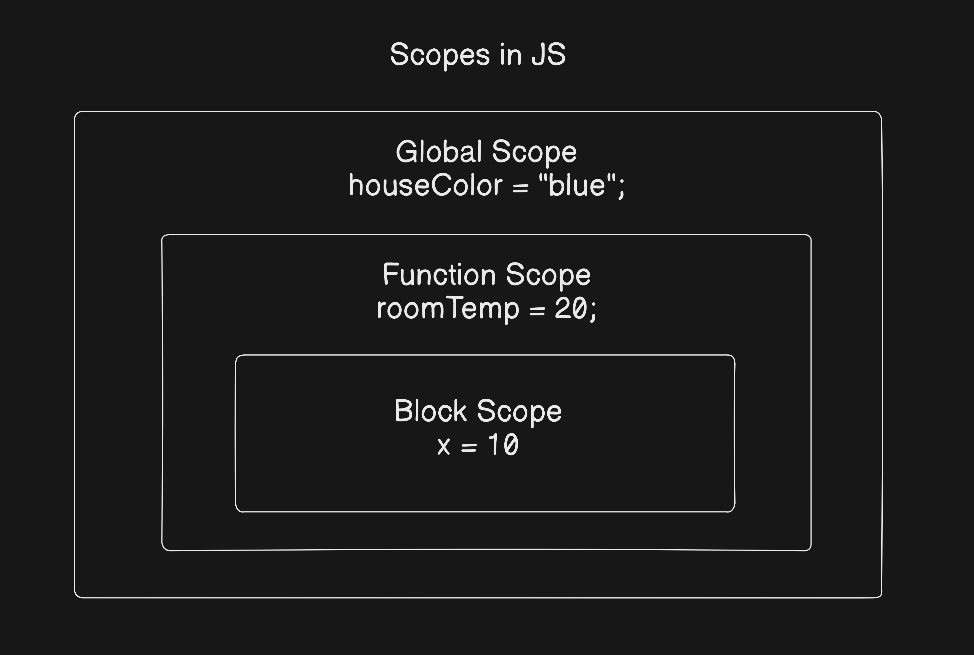
- 'houseColor' is visible everywhere.
- 'roomTemp' is visible inside the function, but not outside.
- 'x' is visible ONLY inside the inner block.
6. Interactive Assignment: Try It Yourself
Copy this code into your browser console (F12 -> Console tab) or an online editor like Replit/CodePen.
Step 1: Declare Variables
// 1. Declare your name (String) - Use const because names rarely change logic-wise in a short script
const myName = "Alex";

// 2. Declare your age (Number) - Use let because you get older!
let myAge = 25;

// 3. Declare student status (Boolean)
let isStudent = true;
Step 2: Print Them
console.log("Name:", myName);
console.log("Age:", myAge);
console.log("Is Student?", isStudent);
Step 3: Experiment with Changes
// Try changing 'let' variable
myAge = 26;
console.log("Updated Age:", myAge); // ✅ Works

// Try changing 'const' variable
// myName = "Jordan";
// Uncomment the line above and run it.
// ❌ You will see: TypeError: Assignment to constant variable.
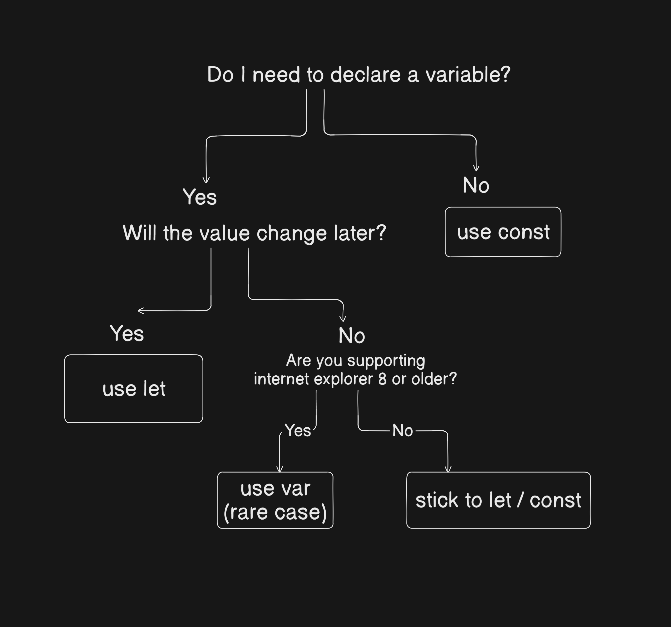
7. The Variable Lifecycle Flowchart
8. Best Practices Summary
Default to
const: Always start withconst. If you realize later you need to change the value, switch it tolet. This protects you from accidental reassignments.Descriptive Names: Use
userAgeinstead ofua. UseisActivefor booleans.CamelCase: JavaScript convention is to start with a lowercase letter and capitalize subsequent words (e.g.,
firstName,totalPrice).One Concept Per Line: Don't declare multiple variables in one line; it reduces readability.
// Bad
let a=1, b=2, c=3;

// Good
let a = 1;
let b = 2;
let c = 3;
Conclusion
Variables are the fundamental building blocks of any JavaScript program. By understanding the difference between let and const, mastering primitive data types, and respecting scope, you write code that is not only functional but also safe and easy to read. Remember the golden rule: Use const by default, and reach for let only when you know the value must change.