DNS Record Types Explained
I am a developer from India.
How does a browser know where a website lives?
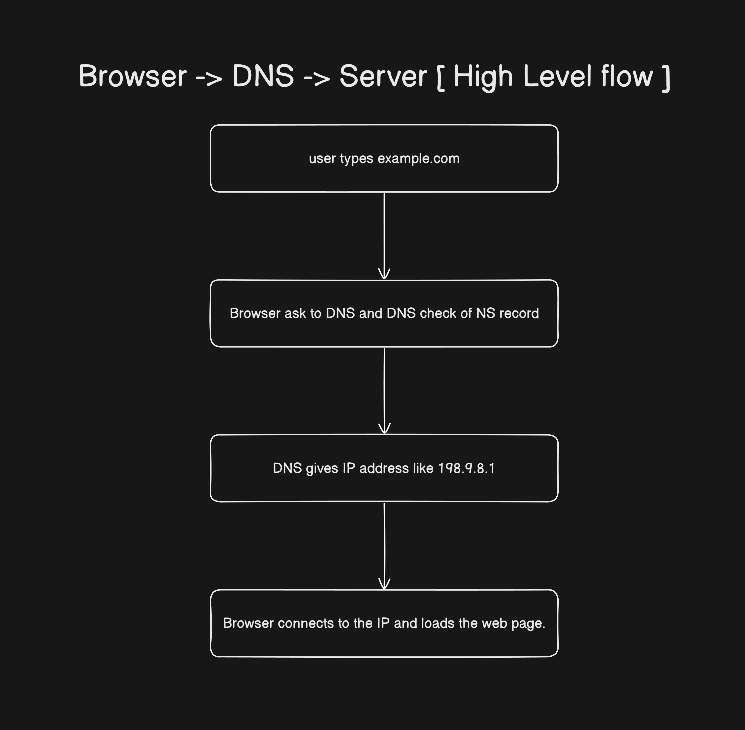
Imagine you want to send a letter to your friend Nikhil. For this, you need his full address, like street, city, house no, etc. The internet works the same way. When you type google.com into your browser, that name doesn’t mean anything to computers. They only understand IPs like 192.9.9.1. SO, to get the IP for your website or google.com. We need DNS.
What is DNS?
Think of DNS (Domain Name System) as the phonebook of the internet.
Just like you find “Nikhil” in your contacts and your phone gives you his number, DNS looks up google.com and gives your computer its IP address—the actual location of the website on the internet.
Without DNS, you’d have to remember numbers, 192.9.9.1 instead of friendly names like google.com.
But DNS doesn’t just give one answer. It uses different kinds of records - like different types of contact info—to handle websites, emails, security checks, and other things.
Why Do We Need DNS Records?
A single domain (like yourblog.com) might need to do several things:
Show a website
Receive emails
Prove ownership to Google or Microsoft
Redirect visitors from
www.yourblog.comtoyourblog.com
Each job needs a different kind of instruction. That’s what DNS is. The whole DNS is doing nothing, just telling the browser, “Who should I talk to next?”
Now, let’s look at the key record types—and the real-world problems they solve.
1. NS Record: “Who’s in managing the domain?”
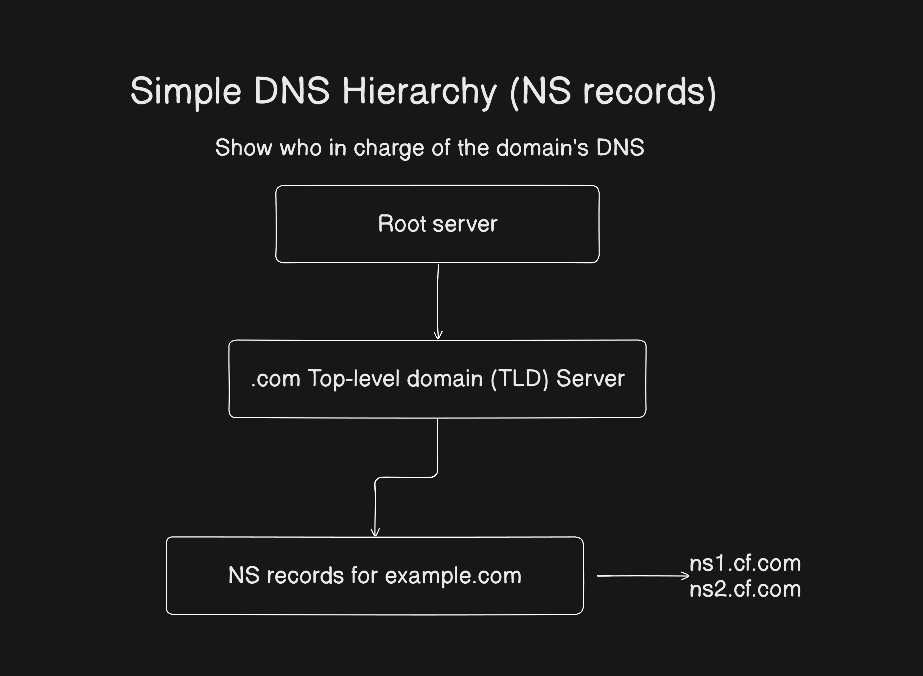
If someone asks, “Who manages the DNS for yourblog.com?” Who answers?
NS (Name Server) records tell who is managing the domain.
These records say: “Ask these servers for all DNS info about this domain.”
Example
yourblog.com → NS → ns1.hostingcompany.com
yourblog.com → NS → ns2.hostingcompany.com
These tell the world: “For anything about yourblog.com, check with these two name servers.”
2. A Record: “Where is the website? (IPv4 version)”
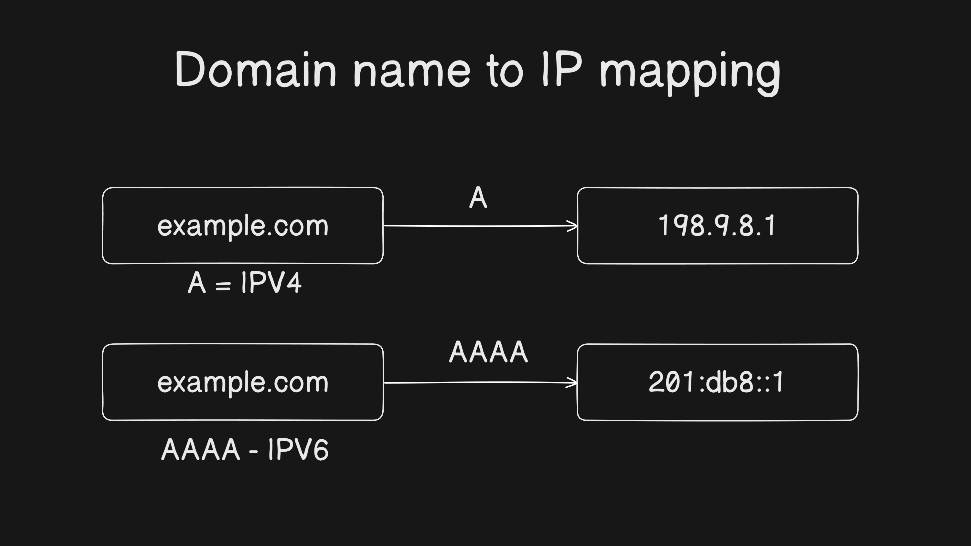
Your browser needs the numeric address of the web server, but you only enter the domain name.
A records map a domain name to an IPv4 address (like 192.0.2.1).
This is like writing down your home address next to your name in the phonebook.
Example
yourblog.com → A → 192.0.2.1
Now, when someone visits yourblog.com, their computer gets 192.0.2.1 and connects to that server.
3. AAAA Record: “Where is the website? (IPv6 version)”
The Internet is running out of IPv4 addresses. So we now also use IPv6—longer addresses like 2001:db8::1.
AAAA records do the same job as A records—but for IPv6.
Example
yourblog.com → AAAA → 2001:db8::1
Most sites today use both A and AAAA, so they work on all networks.
4. CNAME Record: “This name is just another name for that one.”
You want www.yourblog.com to show the same site as yourblog.com—but you don’t want to manage two separate IP addresses.
So, CNAME (Canonical Name) records point one name to another name. There is no IP needed here.
Example
www.yourblog.com → CNAME → yourblog.com
Now, when someone visits www.yourblog.com, DNS first finds the CNAME, then looks up the A record for yourblog.com.
Common confusion
A record = name → IP address
CNAME = name → another name
You can’t use a CNAME for the root domain (yourblog.com) in most cases—use an A record there instead.
5. MX Record: “Where should emails be delivered?”
Someone sends an email to hello@yourblog.com. How does Gmail know which mail server to send it to?
MX (Mail Exchange) records tell email systems where to deliver messages.
Example
yourblog.com → MX → mail.yourblog.com (priority 10)
Note: MX records point to a hostname (like mail.yourblog.com), which then needs its own A record to resolve to an IP.
NS vs MX
NS = who manages DNS for the domain
MX = where to send email for the domain
They do completely different things!
6. TXT Record: “Extra notes for verification or security.”
Services like Google, Microsoft, or email providers (AWS SES) need proof that you own the domain. Or you want to prevent spam.
TXT records store text-based notes that machines can read.
Common uses:
Verifying domain ownership for Google Workspace
Setting up SPF (to stop email spoofing)
Adding DKIM keys for secure email
Example
yourblog.com → TXT → "v=spf1 include:_spf.google.com ~all"
These are the instructions for email servers.
How All These Records Work Together
Let’s see how a small website uses multiple DNS records at once.
Our goal -
Show website at
yourblog.comandwww.yourblog.comEmails sent to
you@yourblog.comarrive in your inboxGoogle can verify that you own the site
DNS Setup:
| Record Type | Name | Value |
| NS | yourblog.com | ns1.hosting.com |
| NS | yourblog.com | ns2.hosting.com |
| A | yourblog.com | 192.0.2.1 |
| AAAA | yourblog.com | 2001:db8::1 |
| CNAME | www | yourblog.com |
| MX | yourblog.com | mail.yourblog.com (prio 10) |
| A | 192.0.2.10 | |
| TXT | yourblog.com | "google-site-verification=abc123..." |
What happens when
- You visit
www.yourblog.com:
→ DNS sees CNAME →yourblog.com
→ Looks up A/AAAA foryourblog.com→ gets IP → loads site
Someone emails
you@yourblog.com:
→ Email server checks MX →mail.yourblog.com
→ Looks up A record formail→ connects to192.0.2.10Google checks ownership:
→ Reads TXT record → finds verification code → confirms you own it
Final Thoughts
DNS records might seem technical, but they’re just instructions for the internet—like labels on your house keys:
A/AAAA = front door (website)
MX = mailbox (email)
CNAME = alias (“back door” = same as front)
TXT = note taped to the door (“Yes, I’m home!”)
NS = property manager (who holds all the keys)
Remember, you don’t need to memorize everything. Just know what each record is for, and you’ll be able to set up almost any website or email system.